English · Español
Explore microtonal tuning through sound and geometry on a keyboard inspired by Erv Wilson. Choose two intervals, play the keys, and discover how the same layout supports different scales.
Start exploring
- Choose 12, 19 or 31 equal divisions of the octave, a Meru tuning, or just intonation.
- Click a key to hear it. Select Chord to hold several notes together; Stop or Escape stops the sound.
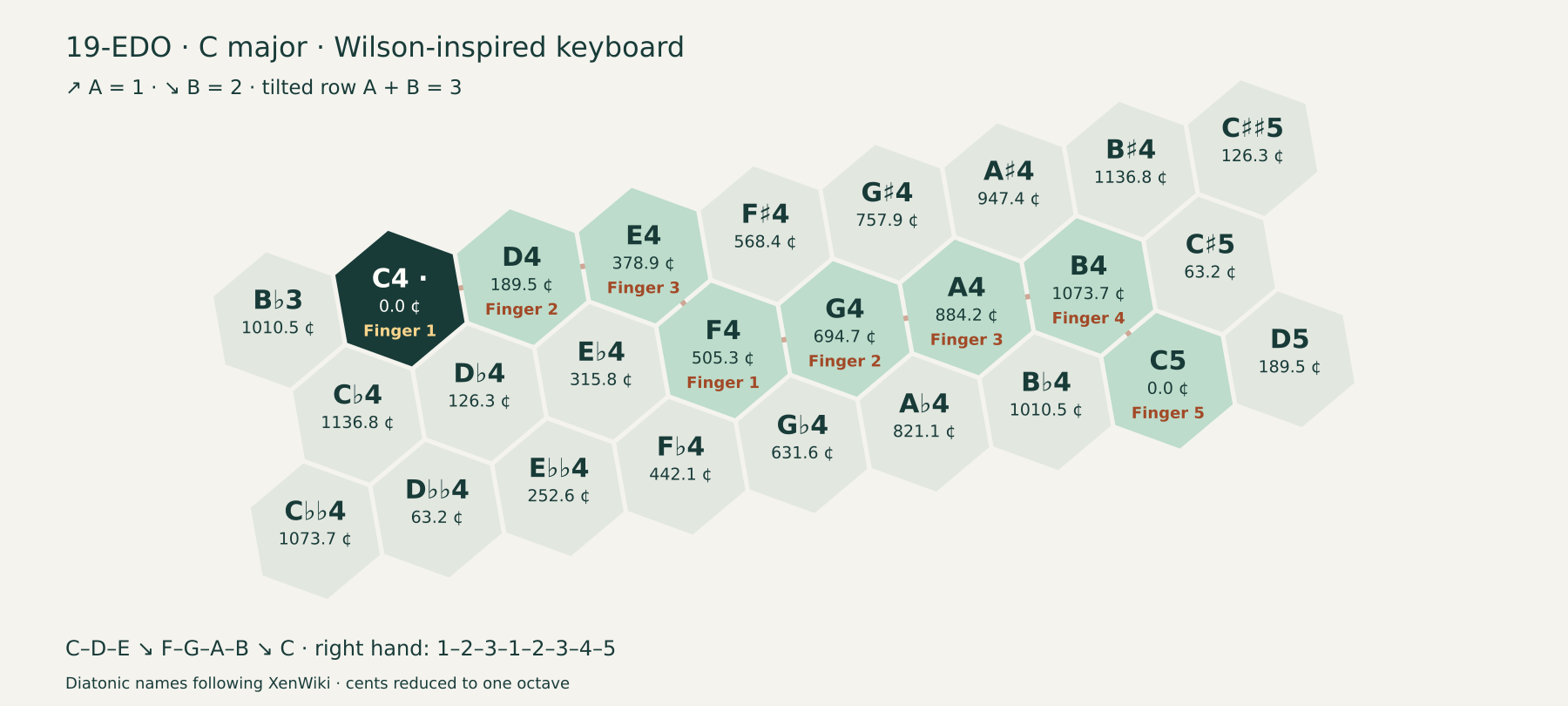
- Choose a Scale guide: C major, G major or C Mixolydian. The numbers show right-hand fingering. Adjust the Keyboard angle to orient the rows.
- Change the two intervals, or switch to MOS to explore scales with two step sizes. Fingering guides appear with the default interval settings for 12, 19 and 31-EDO.
- Change the labels to compare note names, cents, coordinates or EDO steps. Copy link saves the tuning, view and language in a shareable URL.
Two directions and a tilted row
In the starting 19-EDO layout, ↗ A = 1 step and ↘ B = 2 steps. One of each produces the movement along the row: A + B = 3 steps, about 189.47 cents. The starting tilt is 10° and is adjustable; it changes the view, not the intervals.
C–D–E moves along the row; E–F moves down-right for the thumb-under. The C-major fingering is 1–2–3–1–2–3–4–5. The G-major guide shifts the same shape; C Mixolydian places B♭ in the downward direction. These step counts belong to 19-EDO; the other tunings use their own interval sizes.
The two directions are independent. The third movement is their sum: intervals add in cents, while frequency ratios multiply. In just intonation, for example, 6/5 × 5/4 = 3/2.
Note names belong to a tuning
In 19-EDO, C♯ and D♭ are different pitches. Key labels follow their diatonic position, keeping sharps above and flats below. In 31-EDO you can also choose arrow notation. The note names follow the diatonic conventions described in XenWiki, on a keyboard inspired by Erv Wilson’s work.
Meru tunings show degrees and cents where those conventional names do not apply. The just-intonation preset can show exact frequency ratios. You can switch between English and Español inside the app without losing the tuning.
References: 19-EDO notation · 31-EDO notation · Erv Wilson’s keyboards · The Scales of Mt. Meru · Mike Battaglia’s MOS horogram